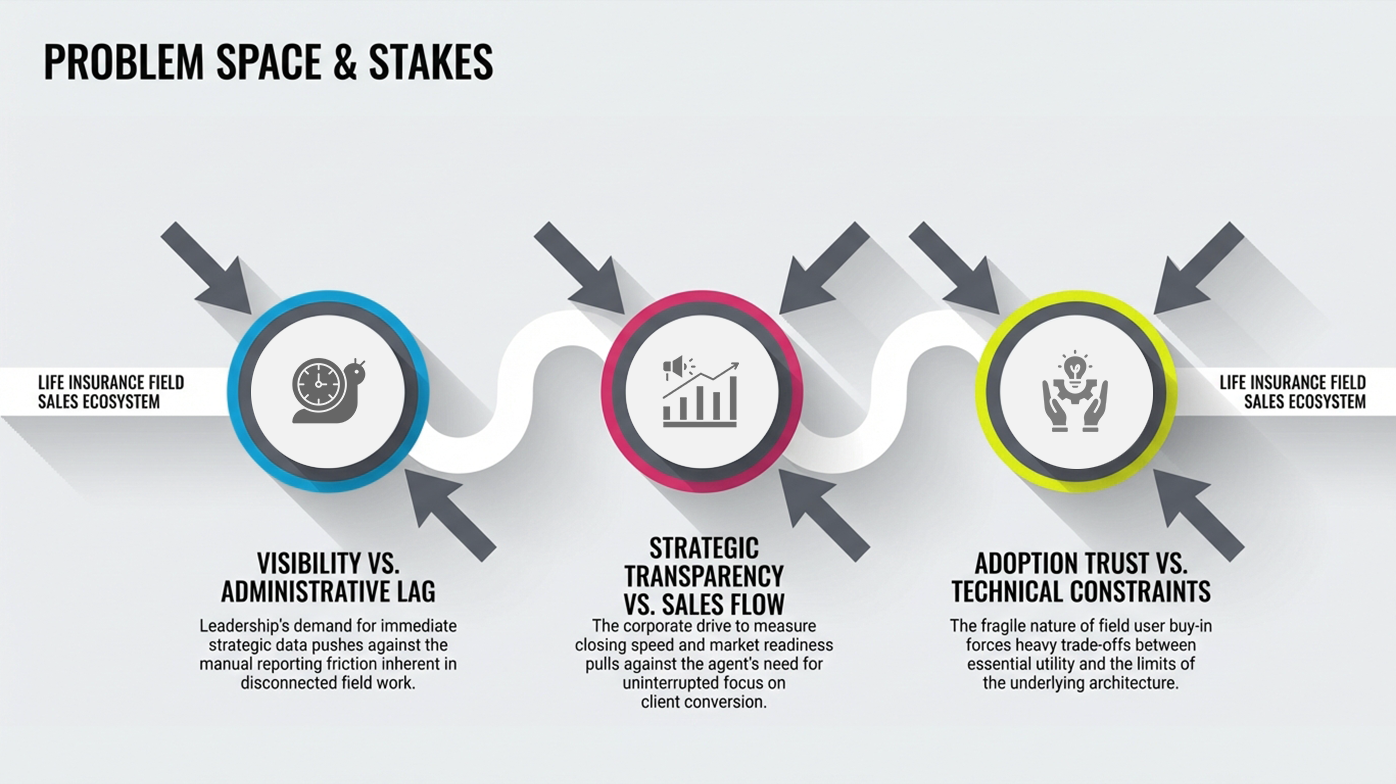
Problem & why it mattered
Manual spreadsheet updates and desktop-only tools created a
data lag.
Management
couldn’t coach in time, and agents lost momentum across campaigns.
Context
- Product: A mobile lead-management
utility for on-the-road agents managing
appointments, follow-ups, and deal progress across active campaigns.
- Why it mattered: Leadership needed
near real-time performance visibility
without increasing admin work; adoption would fail if the app felt like “extra
reporting.”
What was broken / risky
- Administrative friction: Agents
updated spreadsheets at night (or days
later),
making daily performance data unreliable.
- Disconnected workflow: Lead lists,
schedules, and call notes lived in
separate
places—agents relied on memory and workarounds in the field.
- Transformation risk: A
“tracking-first” app would be resisted by Sales;
leadership needed a utility-first product that agents would choose to use.
Workflow (before → after)
Shifting from late-night laptop data entry to
“in-the-moment” mobile utility and
status updates.
Agents updated lead
status manually in Excel/Desktop tools at
the end of the day or week.
One-tap status updates
immediately after a call/meeting ends.
Schedules were
disconnected from lead context; daily routes
planned via memory and messages.
Integrated Contact Book +
Calendar view mapping leads to time
slots and availability.
Management visibility
lagged 24–72 hours, reducing timely
sales
coaching.
Near real-time dashboard
for supervisors to track daily hit
rates and campaign gaps.
Approach & Decisions
I reframed the product from “reporting” to “selling better”
using JTBD +
Day-in-the-Life
mapping to anchor priorities and adoption.
What I did (key moves)
- Product discovery & framing:
Mapped the end-to-end sales journey (lead
→
contact →
appointment → follow-up → close/reject) and translated it into an adoption-first
MVP scope.
- JTBD insight: Agents didn’t want a
database—they wanted a fast assistant
for
“who to call next” and “what to do today.”
- Concept model: Designed the core
mental model as Contact Book +
Calendar
so the app matched how agents already work.
- Stakeholder alignment: Used lo-fi →
hi-fi prototypes and journey maps to
align
Sales, Marketing, and Tech on priorities with minimal late-stage surprises.
Decisions / trade-offs
- Utility over dashboards: Prioritized
fast daily actions (call, set
appointment,
update status) before advanced reporting features.
- Standard over fancy: Traded
native-like animations for stable Bootstrap
interactions to keep PhoneGap performance reliable.
- Calendar as a must-have: Pushed for a
calendar-first UI (not a list)
because time
slots and route reality drive agent behavior.
Delivery under Constraints
Delivering an adoption-critical mobile app under hybrid tech
limits and
high-visibility
stakeholder pressure.
Constraints (top 3)
- Hybrid Framework (PhoneGap): Limited
native gestures and UI richness;
designs
had to be pragmatic and fast.
- Stakeholder power dynamics: Sales
demanded pure utility; Marketing cared
about
brand and messaging. Alignment required clear decision principles.
- Limited user access: Validation ran
through BA + supervisor proxies and
“day in
the life” simulations to approximate real field pain.
How I reduced risk
- MVP slicing: Sequenced delivery around
critical user moments (today list,
appointment booking, status update) to ensure the app was usable from day one.
- Implementation-ready specs: Provided
detailed interaction notes + redlines
to
avoid UI drift and reduce dev/QA rework.
- Feasibility alignment: Worked with
devs early on the calendar component to
keep
the design within Bootstrap/PhoneGap constraints.
- Designed for interruptions:
Low-friction updates and clear recovery paths
so agents stay accurate even mid-route
Impact
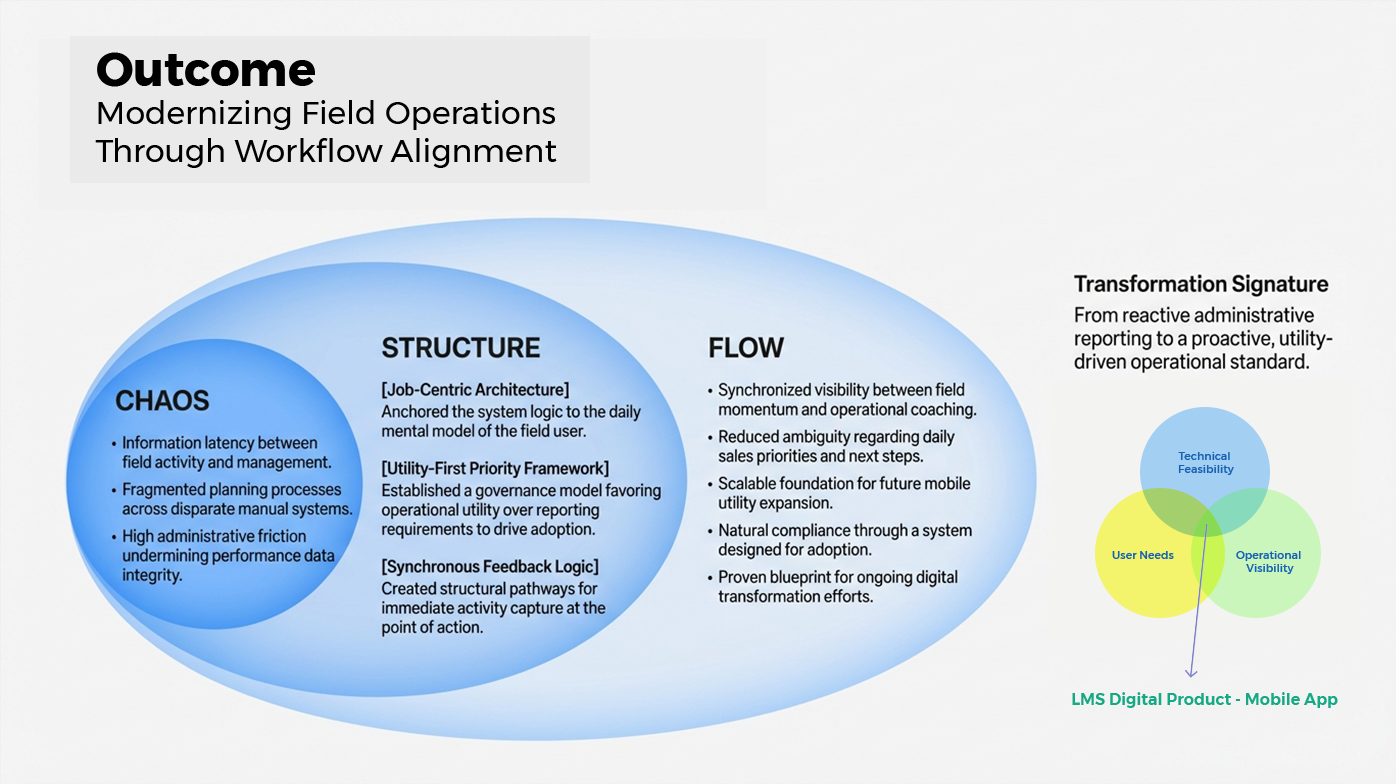
A shipped mobile utility that improved agent workflow and
gave leadership their
first practical, near real-time visibility window.
Data Velocity
Reduced reporting latency from 72 hours to
same-day visibility, enabling leadership to make real-time
tactical
campaign pivots.
Strategic Adoption
Drove high engagement by mapping UX to
existing mental models (Calendar/Contacts) rather than
forcing a new
"reporting" habit.
Operational Efficiency
Realized an estimated ~35% reduction in
rework by bridging Sales/Marketing friction through rigorous
technical
specs.
What improved
- Development efficiency: Estimated
~35% reduction in rework
through clearer acceptance criteria, prototypes, and handoff specs.
- Sales visibility: Reduced reporting
latency from 24–72h to
same-day updates as agents captured outcomes immediately.
- Data freshness: Same-day updates
enabled faster coaching loops and more
reliable campaign decisions.
- Adoption readiness: Minimal training
required because the app matched
existing habits (contacts + calendar) rather than introducing a new “enterprise
workflow.”
- Transformation proof-point: Served as
a flagship success that built
confidence for further mobile modernization.
Next-phase opportunities
- GPS proximity prompts: Suggest nearby
prospects when a schedule gap
appears.
- Voice-to-text notes: Dictation after
meetings to capture details without
typing.
- Smart follow-up nudges: Alerts for
leads cooling off (rules-first now →
model-assisted later).
Learnings
If you build a tool that helps people do their job better,
you get data quality
and
compliance “for free” through adoption.
Operating lessons
- Utility beats tracking: A product that
helps agents sell will naturally
generate
the data leadership wants.
- Vision simplifies prioritization: A
clear day-in-the-life model makes
trade-offs
obvious when constraints appear.
- Internal tools are consumer products:
Internal users still expect speed,
clarity, and low friction—especially on mobile.